
⚡ Available Now
The Digital Signage MCP server.
Let AI agents run your screens.
Sign Inspire exposes your locations, screens, media, campaigns and schedules to any AI assistant through the Model Context Protocol — with per-resource permissions and a full audit log.
MCP endpoint · available now
POST https://app.signinspire.com.au/mcp
Authorization: Bearer <your-mcp-key> · 23 tools · reads always free
Works with your AI assistant
Run every screen from one conversation
Connect Claude, ChatGPT, Cursor or Codex to Sign Inspire — plan, create, schedule and publish digital signage campaigns just by asking. Permissions you control, every action logged.
Claude
ChatGPT
Cursor
Codex
You
Create a weekend sushi promotion for all Adelaide stores. Run it Friday 5pm to Sunday 9pm.
Sign Inspire
- Found 3 locations and 8 screens
- Created campaign draft
- Prepared schedule — Fri 5:00pm → Sun 9:00pm
This action will use 3 AI credits.
Preview campaign
Approve & publish
🔒 Powered by MCP · per-resource permissions · reads are always free · you approve before anything publishes
23 tools · 6 resources
What your AI agent can actually call.
Every tool maps to a real Sign Inspire operation. Tools you do not have permission for are hidden from tools/list entirely.
Locations
4 toolslist_locations
create_location
update_location
delete_locationDevices & screens
3 toolslist_devices
get_device
update_deviceMedia
5 toolslist_media_folders
list_media
create_media_folder
update_media_folder
delete_mediaTemplates
1 toollist_templatesCampaigns
5 toolslist_campaigns
get_campaign
create_campaign
update_campaign
delete_campaignSchedules
5 toolslist_schedules
get_schedule
create_schedule
update_schedule
delete_scheduleHow it connects
Your AI assistant, your screens — you in control.
Every request flows through the MCP server with per-resource permissions and a full audit log, and nothing reaches a screen until you approve it.
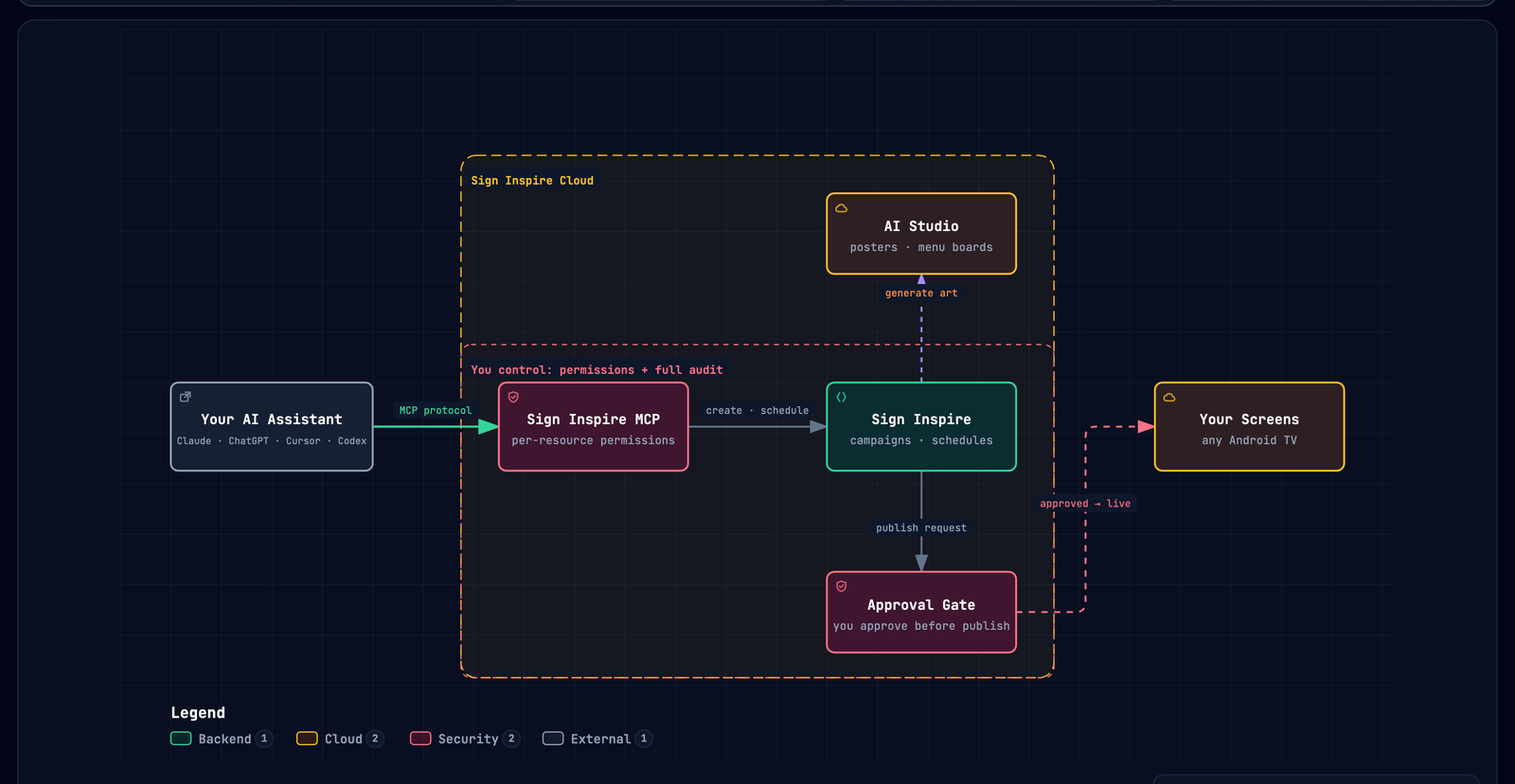
Permissions
Read, create, update, delete — per resource.
MCP access is granted per resource and per action, and every call is written to an audit log with the client name, tool, duration and result.
| Plan | MCP access |
|---|---|
| Free | Read-only |
| Starter | Read-only |
| Creator | Read + create + update — delete stays off until you grant it |
| Growth | Advanced, with delete controlled separately |
Standard MCP reads never consume AI credits. A create or edit costs 1 credit. See full pricing →
Works with
Any MCP client.
Claude DesktopClaude CodeCursorClineWindsurfAny MCP host
Available now
Connect your AI assistant to your screens.
Point Claude, ChatGPT, Cursor or Codex at Sign Inspire over MCP. Per-resource permissions, a full audit log, and reads are always free.
Connect Sign Inspire →